In order to participate in the MINDS2021 Study, you must connect your Fitbit to your Study Dashboard. This is how we collect your data from your Fitbit device for the study.
Note: Please continue with these steps only after you have completed downloading the Fitbit App, set up your Fitbit account and connected your Versa 3 device to the Fitbit App.
Instructions:
-
Go to your Study Dashboard. Open the Minds2021 app on your smartphone device and click on the Dashboard button on the bottom left corner of your screen. (You can also login to your Study Dashboard on your laptop or computer.)
-
Click on the Connect Your Fitbit button.
-
Log in to your Fitbit account when prompted.
-
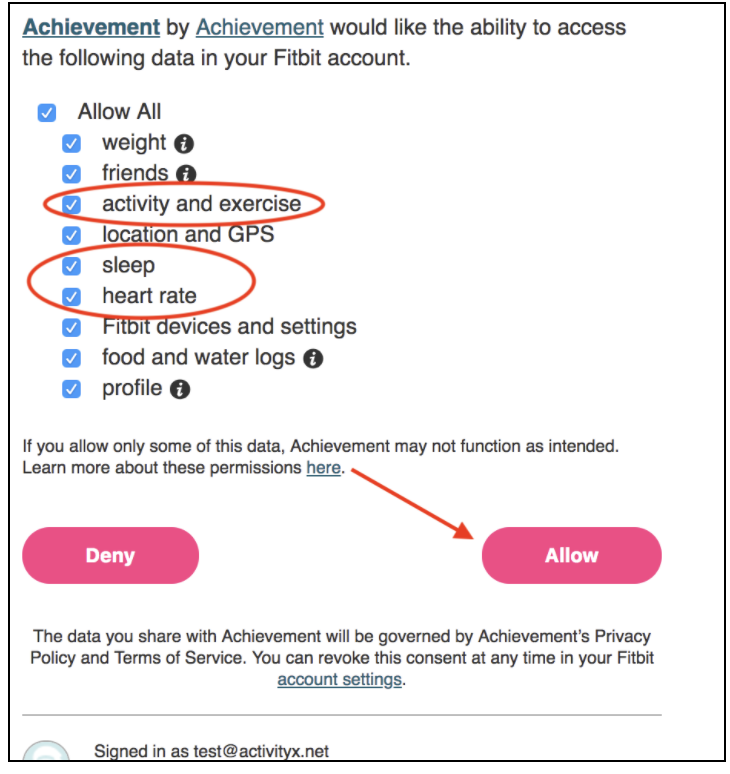
Select "activity and exercise", "sleep", and "heart rate" (or select "Allow All" at the top) from the options listed. These three activity streams are required for enrollment.
-
Click Allow. Once your Fitbit is connected to your Study Dashboard and you’ve allowed access to “activity and exercise,” sleep,” and “heart rate” data, you’ll receive the following message on your Study Dashboard: “Thank you for connecting your Fitbit to your studies dashboard!”
Note: You can confirm your Fitbit connection and data sharing in the Settings tab of your Fitbit dashboard by clicking on Applications. You should see the study name (MINDS 2021) and the data you allowed access to below it (sleep, activity, heart rate).