iPad Auto-Lock
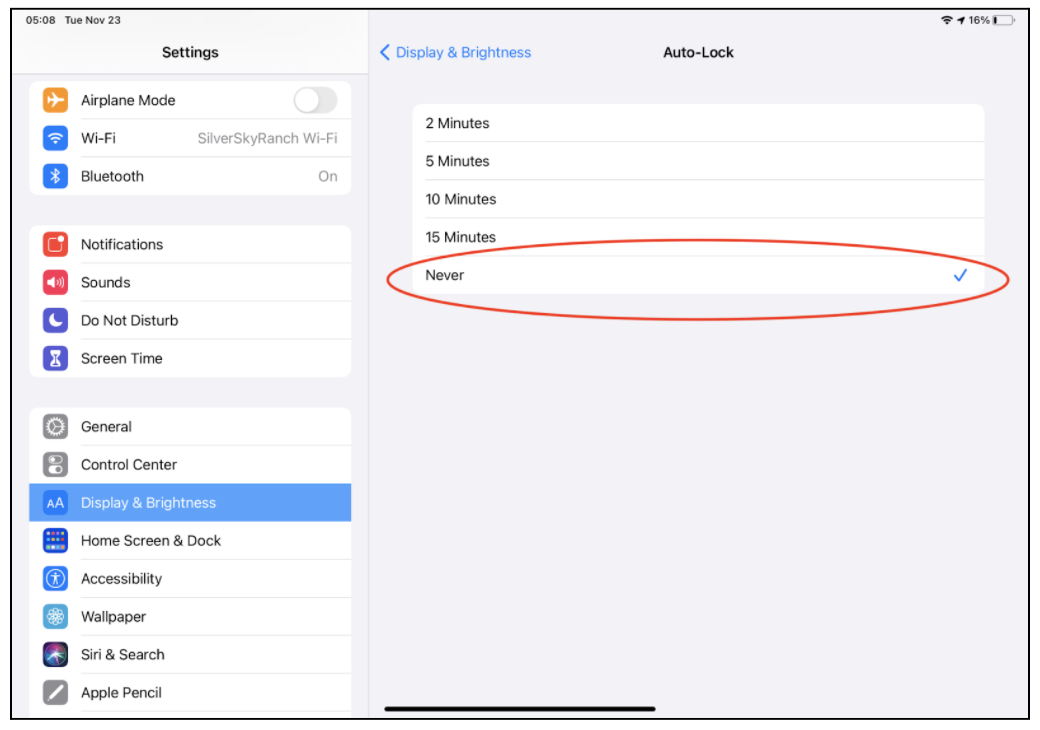
Changing your “Auto-Lock” settings to “Never” will allow your iPad screen to stay active for the duration of the memory games.
How to change your Auto-Lock settings:
- Open your iPad settings by tapping on the Settings icon.
- Tap on Display & Brightness
- Tap on Auto-Lock
- Select “Never”
- You can now exit out of your Settings by pressing the home button.
- Tap on the Cantab Connect app when you are ready to begin the memory games.

Once you are done with the memory games, you can reset your Auto-Lock settings back to the time duration that you would like by repeating Steps #1-3. Please note this setting should be changed to “Never” before each monthly memory game.